flowchart LR

models@{ shape: db, label: "(model, quant.)" }
llama["llama-fit-params"]
out["projected max.<br>context size"]

models --> llama --> out
Down the Rabbit Hole: Setting Up a Local LLM with llama.cpp
tech
LLM
hardware
Why I Tried a Local LLM
This post describes how I turned an underused NVIDIA GeForce RTX 3090 with 24 GB of VRAM into a personal LLM endpoint. It is not a complete llama.cpp installation guide. I focus on the choices that determined whether a model was practical on this hardware: model size, context length, KV-cache precision, CPU/GPU placement, and generation speed at long context.
I bought the RTX 3090 second-hand from a former cryptocurrency miner in May 2023. It replaced an RTX 2080 Ti that had carried me through most of my PhD research, but during my postdoc years the newer card mostly ran games. The hardware was powerful enough for model inference and idle often enough to make a local endpoint appealing.
Earlier attempts had not convinced me. I tested Galactica and Meta’s Llama models with PyTorch and built a simple retrieval-augmented generation (RAG) prototype, but the setup felt fragile and the results were not useful enough to justify maintaining it. Later improvements in open-weight models, quantization, and local inference tools made the same idea worth revisiting.
Reports from the LocalLLaMA community gave me a practical starting point: quantized models were running on consumer GPUs, and tools exposed OpenAI-compatible endpoints without requiring a custom serving stack. I began with the lowest-friction option and added control only when I had a reason to use it.
From Ollama to llama.cpp in Three Stages
The obvious first step was not to build everything from source, but to start with the tool that removed the most friction.
Stage 1: Ollama for Exploration
I started with Ollama, largely because it is the path of least resistance. I pulled the Docker container with a single command. In OpenWebUI, pulling a model was just a matter of pasting its name into the frontend. So, getting a local model with a working chat interface took about five minutes. This was exactly what I needed at this stage: a low-friction way to get a feel for what local models are capable of.
I experimented with a handful of models and basic prompts to see whether a local model could help with coding tasks and how its responses compared with the hosted models I used. Ollama made that comparison possible without requiring a deeper serving setup.
Stage 2: Ollama as an OpenAI-Compatible Endpoint
Once comfortable with the basics, I tested integrations with tools that expect an OpenAI-compatible API. Ollama serves a compatible /v1/chat/completions endpoint out of the box, so I used it as a drop-in backend for several client applications and scripts.
This stage was short-lived but informative. It confirmed that local models could indeed function as API backends, opening up possibilities beyond just chatting in a web interface. But I also hit the natural limits of this approach: limited control over details such as KV-cache type and GPU layer offload; limited benchmark reproducibility; no visibility into what was happening under the hood; and growing curiosity about whether I could get better performance.
Stage 3: llama.cpp as My Personal LLM Endpoint
I replaced Ollama with llama.cpp, which has evolved significantly since its early days. It now includes its own web-based UI for quick testing and token generation inspection, bridging the usability gap that Ollama originally filled. But more importantly, llama.cpp offers far greater control over inference: GPU layer offloading, custom batch sizes, KV cache configuration, and a multitude of quantization options.
Today, I use llama.cpp as my personal LLM endpoint. I am the only user. It serves requests to agentic tools like Cline, provides the backend for local code review sessions, and runs experiments whenever I want to test a new model or quantization. The llama.cpp server mode (the server binary with --host and --port flags) gives me a reliable API endpoint that any client can talk to, while the built-in web UI at /chat lets me quickly test prompts and observe token generation without writing any code.
Models Tested: Qwen, Gemma, and GaMS
Once the endpoint itself was stable, the bottleneck moved from tooling to model choice. I needed models that were useful for my tasks and small enough to fit into 24 GB of VRAM.
I tested many models beyond these, but I highlight Qwen, Gemma, and GaMS here for different reasons.
Qwen is Alibaba’s open-weight model family, and it has become one of the default names in local-LLM discussions. The variants that kept showing up in my searches were the 27B dense model and the 35B-A3B mixture-of-experts model: large enough to be interesting, but still realistic to attempt on a 24 GB card with quantization.
Gemma is Google’s open-weight model family. Gemma 4 was especially relevant for this setup because it offers a spread of sizes and architectures, from smaller edge-oriented models to larger dense and MoE variants, making it a useful comparison point for both quality and hardware fit.
GaMS (Generative Model for Slovene) is a family of models specialized for the Slovene language and trained within the PoVeJMo research program. The latest iteration GaMS3 is built on a Gemma 3 backbone, and it was an exciting project in our local community.
I went for Qwen and Gemma because they are popular and relevant to the hardware question I wanted to answer. Popularity means collective problem detection and resolution. For me, it also means less time wasted rediscovering and dealing with issues. GaMS belongs in the story for a different reason: it connects the same local-inference setup to Slovene-language work and to a project from the local research community.
I include GaMS for context, but the benchmarks below focus on Qwen and Gemma because those were the model families I tested systematically.
Before comparing those models, the main constraint needs to be clear: the advertised context window is not the same thing as the context window that remains fast and practical on a fixed GPU.
Context, Quantization, and the VRAM Budget
For local LLM work, one of the most important practical limits is the effective context window: how many tokens the model can keep in context while still running at a useful speed.
Note
There is a small naming trap here. People often use 128k, 131k, 256k, 262k, 131072, and 262144 almost interchangeably when talking about context length. The confusion comes from mixing decimal kilo (1000) and binary kibi (1024) units. For example, the Hugging Face model card for Qwen lists qwen35moe.context_length as 262144. Dividing by 1024 gives 256, so I call it a 256K-token context window throughout this post.
The models I tested sit in this long-context range. Qwen 3.6 advertises a 256K-token context window, while Gemma 4 spans 128K for the smaller variants and 256K for the larger ones. Those advertised lengths are important, but they are not the same thing as “this will fit comfortably on my GPU.”
I treat the advertised context length as the range supported by the model’s configuration and documentation, not as a guarantee that every prompt will behave equally well throughout that range. Running beyond it may require an extension method such as YaRN, and output quality is not guaranteed outside the model’s evaluated range. I do not test extended contexts in this post.
Longer context is useful, especially for code, documents, and agent workflows, but it is not free. The context is stored in the KV cache, and the KV cache consumes memory. On a local setup, that memory is usually scarce GPU memory. Offloading to system RAM is possible, but it quickly becomes a performance tradeoff. For comparison, my RTX 3090 FE has a theoretical memory bandwidth of 936.2 GB/s, while dual-channel DDR4 at 3600 MHz on the Ryzen system reaches 57.6 GB/s. That gap is large enough to feel in practice.
This is where quantization enters. Quantization stores model weights, and optionally the KV cache, with fewer bits so the same model can use less memory. These benchmarks measure the resulting memory and speed differences, not the effect on response quality. Lower precision can change model outputs, but this experiment does not measure how large that change is or whether it affects a particular reasoning task.
The rest of this section looks at the tradeoff from a few angles: model size, runnable context, KV-cache precision, CPU/GPU placement, and long-context generation speed. I tweak one subset of parameters at a time so the compromises are easier to see, and I treat the figures as hardware-specific evidence rather than universal rankings.
Note
By default, llama.cpp uses float16/f16 for the KV cache. For Qwen 3.6, Unsloth recommends bfloat16/bf16 instead. Since Qwen 3.6 was trained with bf16, and NVIDIA Ampere cards such as the RTX 3090 support bf16 natively, I set the KV cache type explicitly in the benchmarks. The difference between f16 and bf16 is explained here.
How I Estimate Fit and Measure Speed
I split the benchmarking into two separate questions.
The sizing question is how much context a model can theoretically fit into the available VRAM. I use llama-fit-params to estimate the memory needed for model weights, KV cache, compute buffers, and backend overhead. It then reports either the maximum context size that should fit or the offload parameters needed to reach a target context size.
The performance question is how fast the configuration runs once loaded. I use llama-bench because fitting into memory and being pleasant to use are not the same thing. A configuration can technically support a large context window while becoming too slow for interactive work.
The workflow is:
- Use
llama-fit-paramsto estimate whether the model and KV cache fit in VRAM. - If the full target context does not fit, let
llama-fit-paramssuggest CPU/GPU offload parameters. - For MoE models, test special placement options such as
-cmoe, which offloads expert layers to CPU. - Run
llama-benchon the resulting configuration to measure generation speed at increasing context depth. - Compare the tradeoff between context length, quantization, offloading, and throughput.
For the maximum-context experiment, the inputs are only the model and quantization choice:
For the hybrid/offload experiment, I fixed the target context length first and let llama-fit-params search for a placement strategy:
flowchart LR

models@{ shape: db, label: "(model, quant., ctx size)" }
llama["llama-fit-params"]
out["offload tune<br>parameters"]

models --> llama --> out
Model Sizes
Before context length enters the picture, the first constraint is model size. The quantized weights need to fit in VRAM with enough room left for the KV cache and compute buffers. On a 24 GB GPU, this already narrows the field.
| Model | Type | Quantization | Size (MiB) |
|---|---|---|---|
unsloth/Qwen3.6-35B-A3B-GGUF |
MoE | UD-Q6_K_XL |
30,358 |
unsloth/Qwen3.6-35B-A3B-GGUF |
MoE | UD-Q5_K_XL |
25,350 |
unsloth/Qwen3.6-35B-A3B-GGUF |
MoE | UD-Q4_K_XL |
21,314 |
unsloth/Qwen3.6-27B-GGUF |
Dense | UD-Q4_K_XL |
16,786 |
unsloth/gemma-4-26B-A4B-it-GGUF |
MoE | UD-Q6_K_XL |
22,201 |
unsloth/gemma-4-26B-A4B-it-GGUF |
MoE | UD-Q5_K_XL |
20,220 |
unsloth/gemma-4-26B-A4B-it-GGUF |
MoE | UD-Q4_K_XL |
16,208 |
These sizes are not the full runtime memory requirement, but they are a useful first filter. If the model weights already fill most of the card, a long context window will require KV-cache quantization, CPU/GPU offloading, or both.
Estimating Runnable Context
After checking model sizes, the next question is not whether the model can load, but how much context can remain on the GPU. I used llama-fit-params for this step instead of calculating the memory budget by hand.
The tool inspects the selected model, quantization, KV-cache type, available GPU memory, and llama.cpp runtime buffers. It then either reduces the projected context size to something that fits, or suggests CPU/GPU placement parameters when I ask for a specific target context.
These results are specific to my RTX 3090, my llama.cpp build, and the amount of free VRAM at the time of testing. I therefore treat them as sizing results, not reusable command-line recipes. The exact offload pattern may change on another machine.
The important pattern is simple: model weights and KV cache compete for the same VRAM. Higher-precision KV cache keeps more numerical detail but leaves less room for long context. Quantized KV cache gives up some precision, but it can make much larger context windows fit.
In practice, this split produced three kinds of configurations: models that fit fully on the GPU only after reducing the context window, models that reached the advertised context by using a lower-precision KV cache, and models that reached the target context only by moving some work to CPU memory. The benchmark curves below are meant to show how different those choices feel once generation starts.
For reproducibility, one example llama-fit-params invocation and output is included in the appendix.
Benchmarking Long-Context Generation
These benchmarks focus on decode speed at different context depths. In llama-bench, I set n_prompt = 0, kept n_gen at the default 128, and increased n_depth across powers of two. This means the benchmark does not measure prompt processing speed, time to first token, or full request latency. Instead, it measures how quickly the model can continue generating once the KV cache is already populated.
That is the behavior I care about for long-running chats, code-review sessions, and agent workflows. In those cases, the model may already be carrying tens or hundreds of thousands of tokens, so I measure how generation slows as the context grows.
The benchmark machine was:
- Ryzen 7 5800X (8C/16T)
- ASUS TUF Gaming B550M-Plus WiFi II, PCIe 4.0 x16
- 32 GB DDR4 at 3600 MHz
- NVIDIA RTX 3090 FE, 24 GB VRAM
llama.cppbuild9544(98d5e8ba8)
The figures below are generated from results-b9544.json. Each curve represents a runnable configuration after the fit step: model quantization, KV-cache type, target context, and any CPU/GPU placement selected by llama-fit-params.
These plots should not be read as general model-quality rankings or full end-to-end serving benchmarks. They isolate one performance question: generation throughput while carrying a large context.
The figures are grouped by model family and quantization. The x-axis is existing context depth, while the y-axis is generation throughput.
Qwen 3.6
For Qwen, I tested both the 35B-A3B MoE variants and the 27B dense variant. This makes the comparison useful for separating model-size pressure from architecture differences.
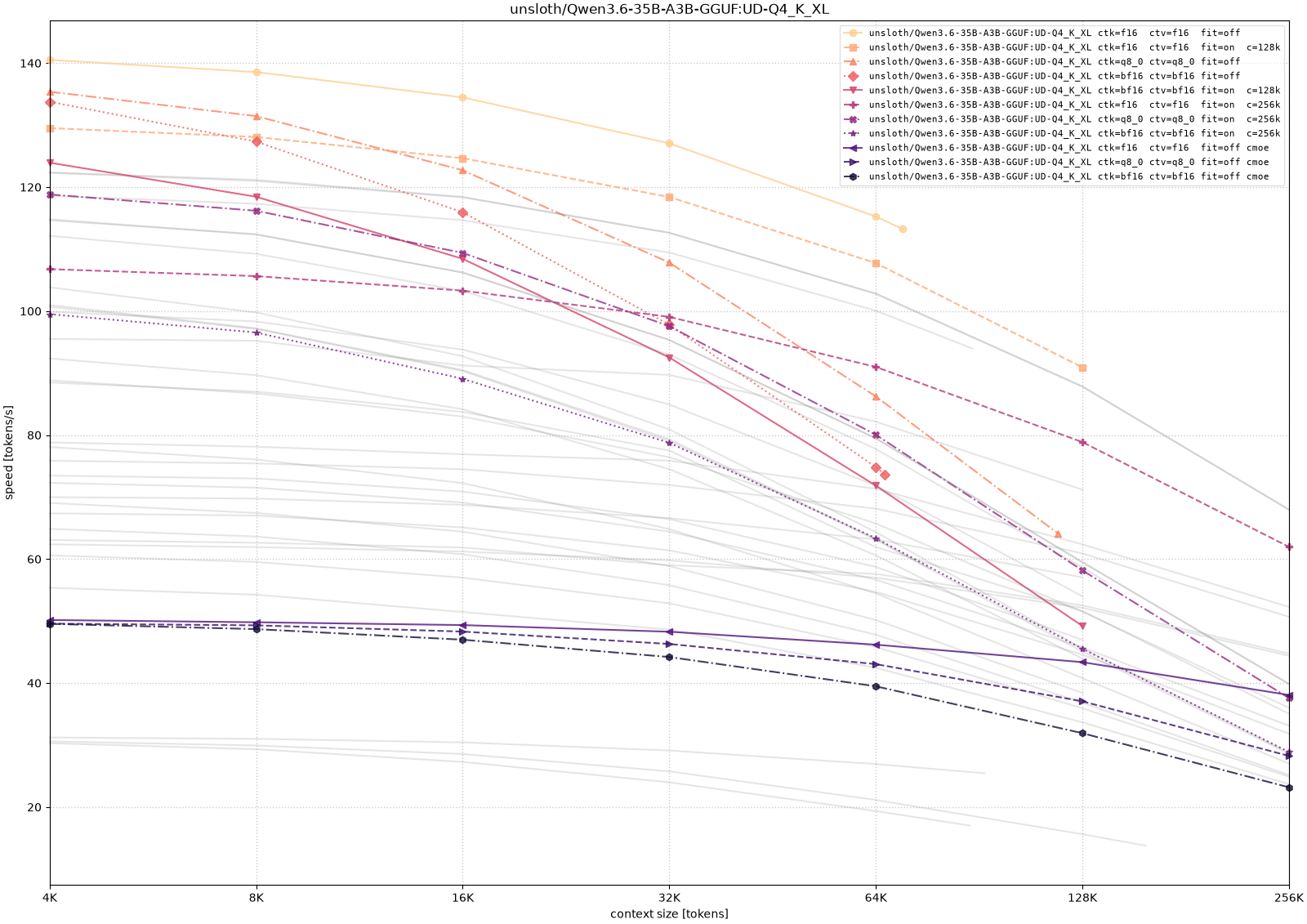
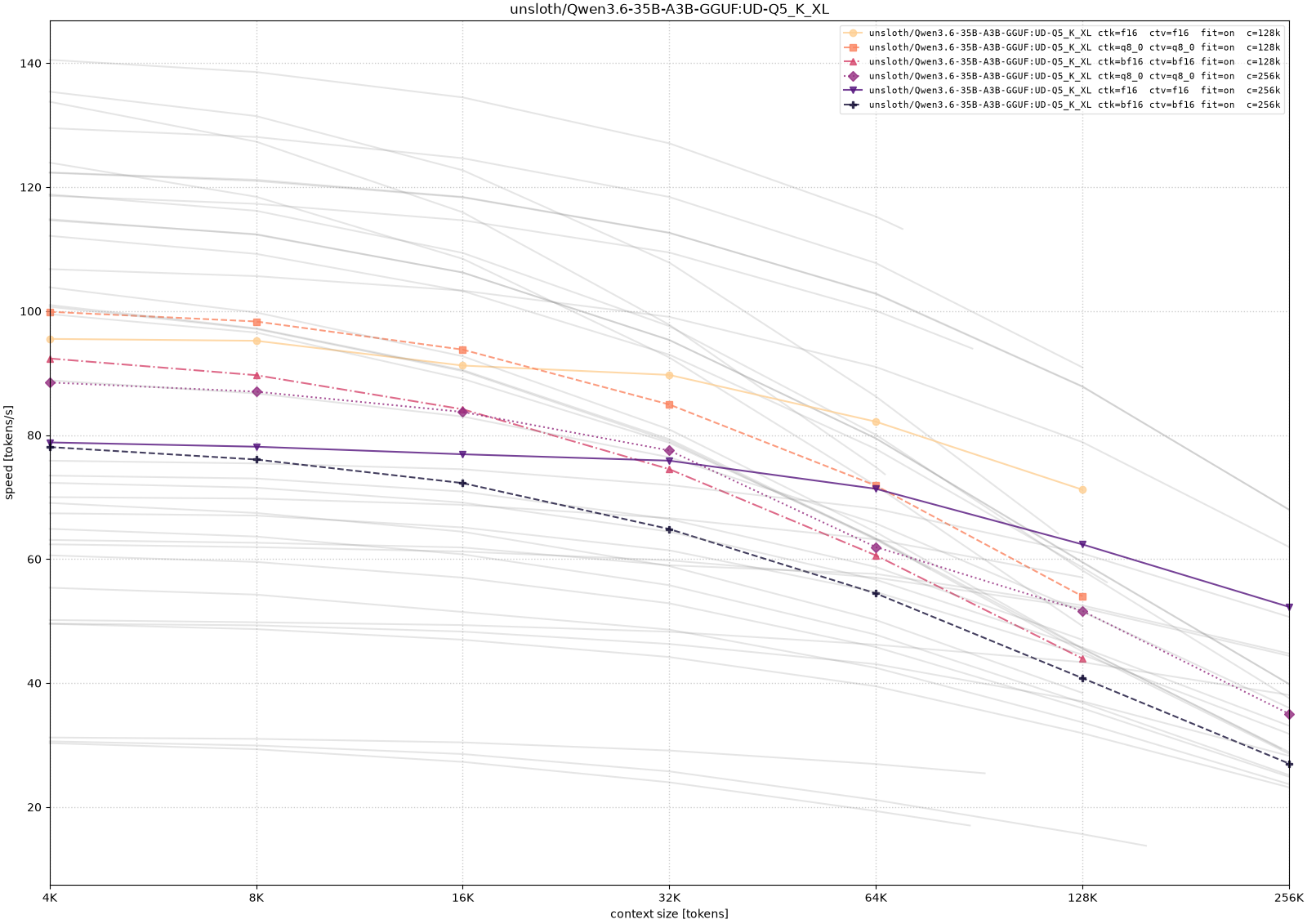
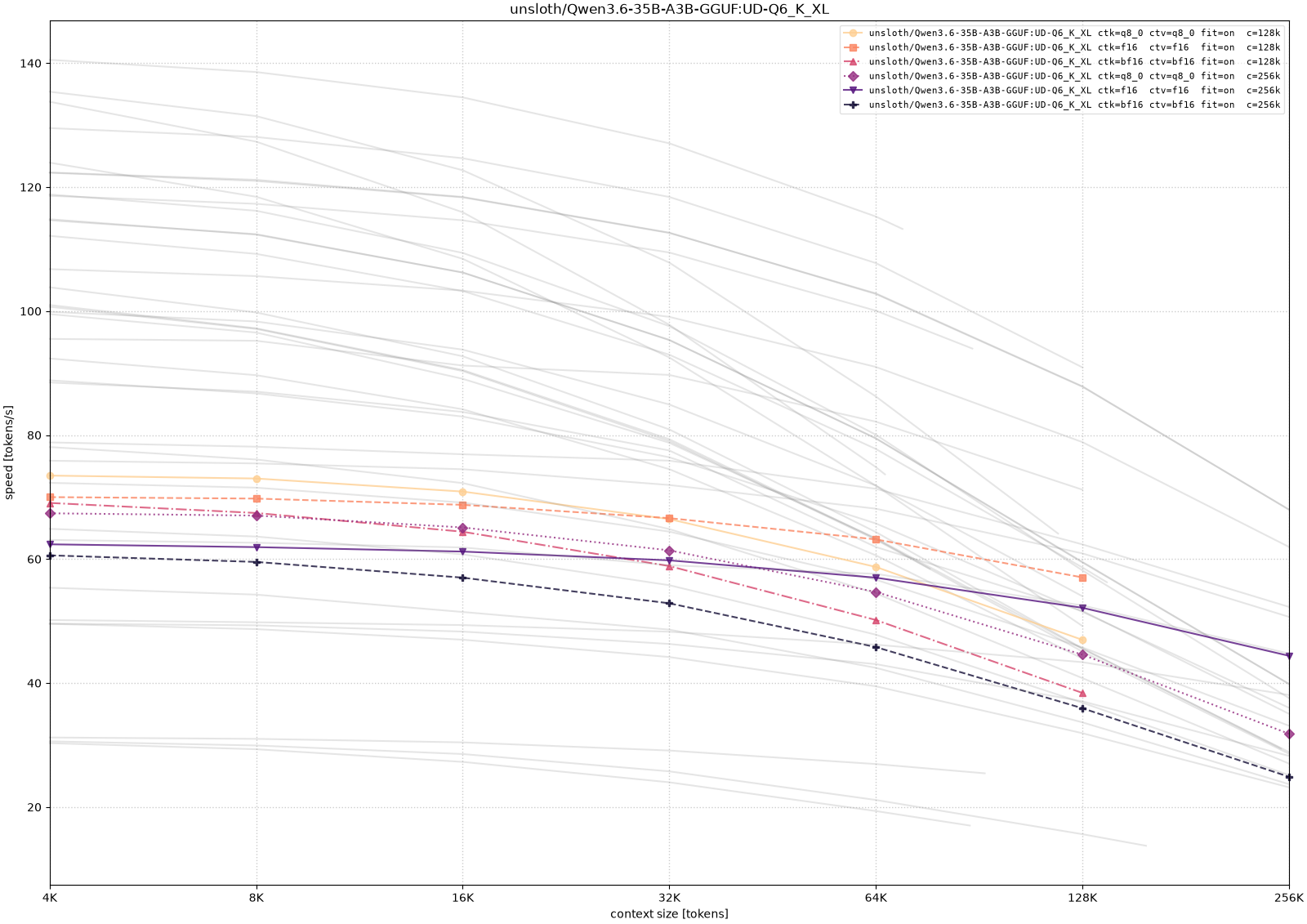
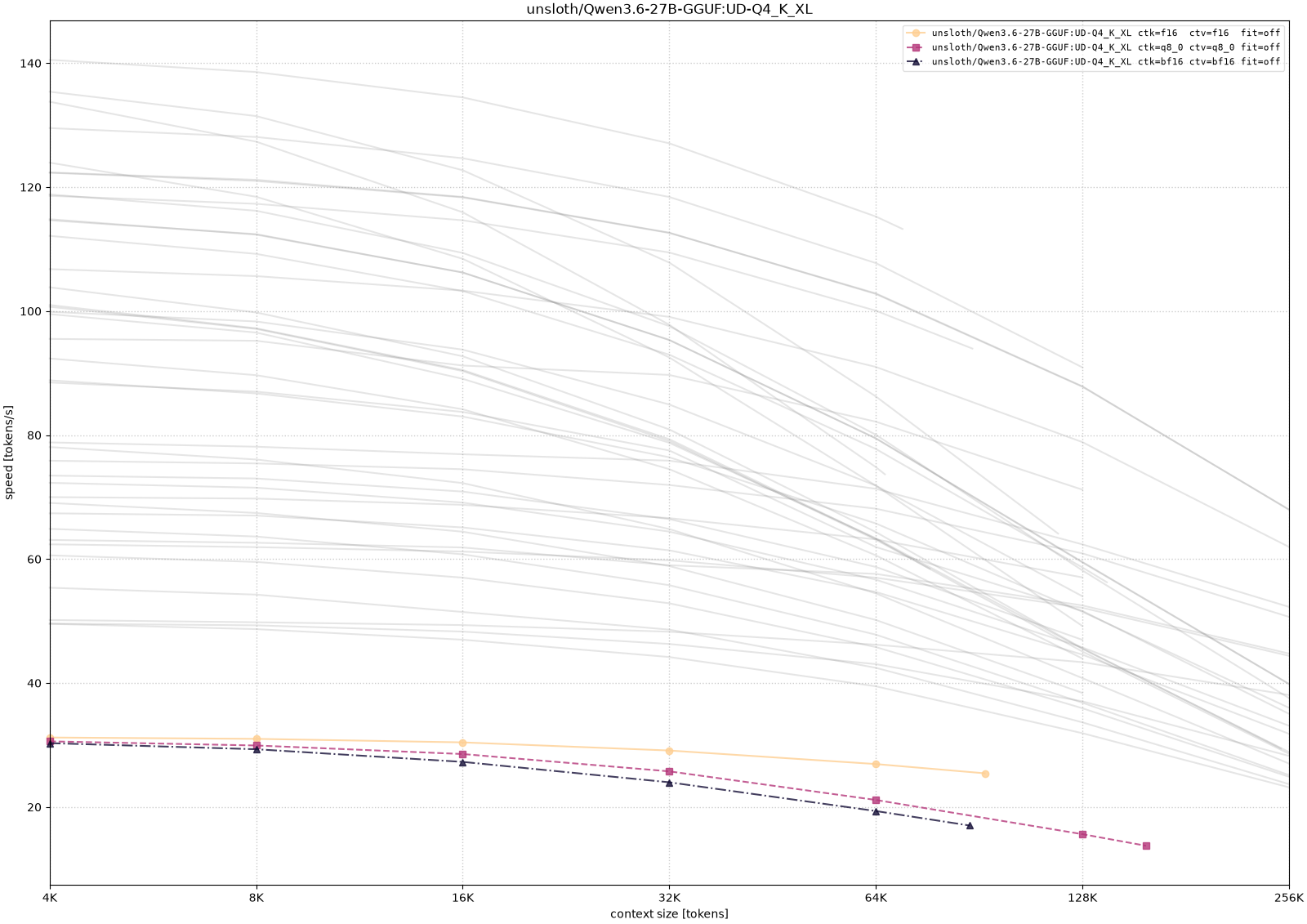
The Qwen curves show the expected memory-speed tradeoff most clearly. The 35B-A3B model becomes much easier to run as the weight precision decreases, but the long-context configurations still pay for memory pressure: CPU/GPU placement and larger context targets reduce throughput as depth increases. The 27B dense model is smaller in parameter count, but in these measurements it was not automatically faster, which is a useful reminder that architecture and implementation details matter alongside raw model size.
Gemma 4
For Gemma, I tested the 26B-A4B MoE variants. I also checked the 12B dense model during exploration, but I leave it out of the plotted comparison here because the systematic long-context runs below focus on the 26B-A4B family.
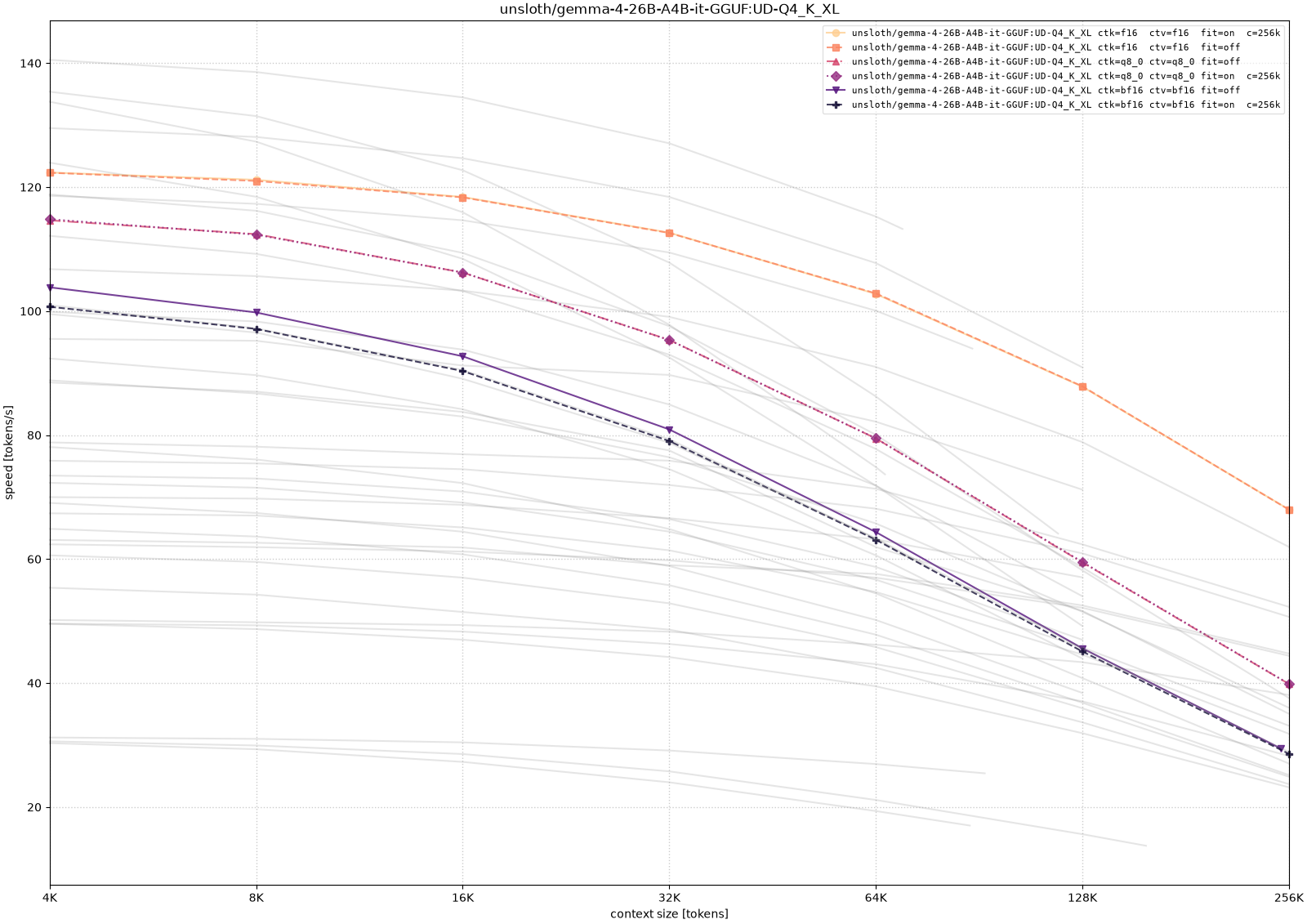
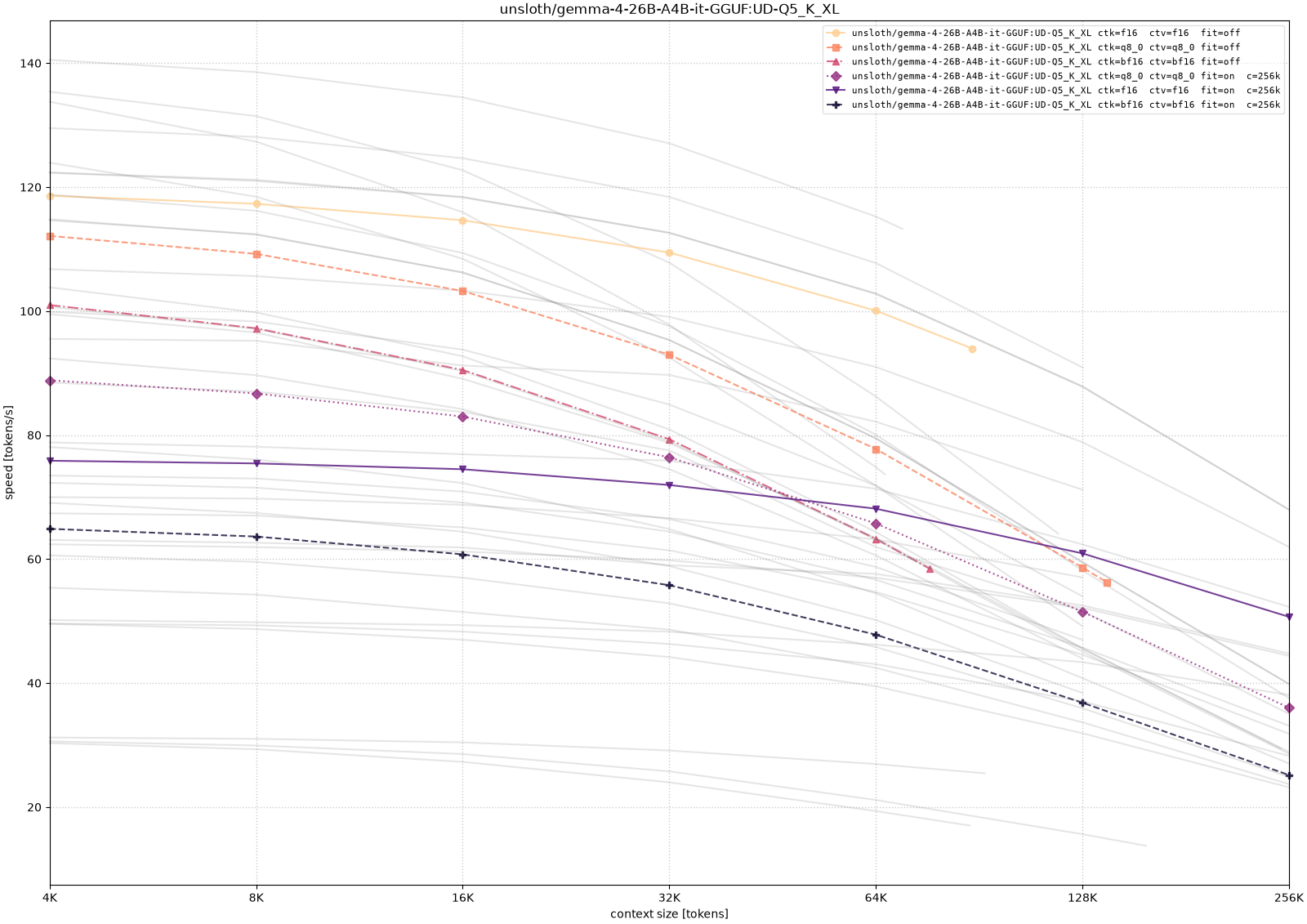
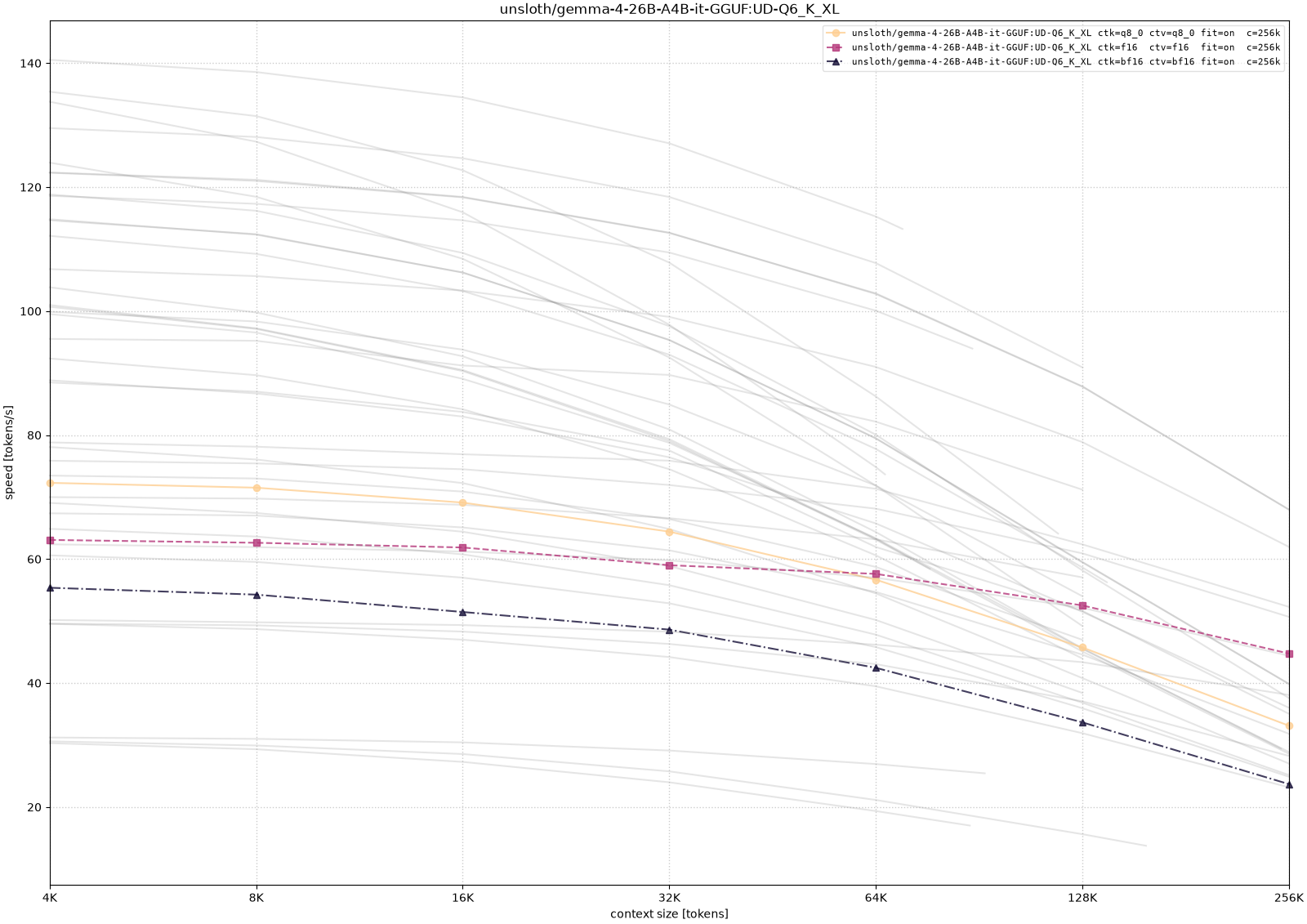
The Gemma runs tell a similar story with a slightly cleaner comparison across quantization levels. The lower-precision weight variants leave more room for long context, while larger quantizations need more aggressive placement choices to reach the same target. As with Qwen, configurations that technically load at 256K context are not equivalent in practice; the throughput curve is what decides whether the setup still feels interactive.
The pattern is more useful than any single number. Larger quantizations consume more memory before generation even begins. Higher-precision KV cache leaves less room for context. CPU/GPU hybrid placement can make otherwise impossible contexts load, but it may reduce throughput sharply. Quantized KV cache is often the more attractive compromise when the goal is to keep long context on the GPU.
For my use case, that is the main lesson. The RTX 3090 did become a useful local LLM machine, but not because every advertised 128K or 256K context window automatically fits or runs well. The workable setup comes from treating llama.cpp as a tuning surface: choose a model that leaves enough memory headroom, pick a KV-cache type deliberately, and accept CPU offload only when the extra context is worth the speed penalty. That is the point where the old gaming GPU stopped being idle hardware and became a practical local endpoint.
Appendix
Example llama-fit-params Output
This is a representative fit run. The exact output is hardware-specific, and this particular quantization is illustrative rather than one of the plotted benchmark configurations, but it shows the kind of decision llama-fit-params makes before benchmarking.
./llama-fit-params \
  -hf unsloth/Qwen3.6-35B-A3B-GGUF:Q4_K_M \
  -fit off \
  -fa on \
  -ctk bf16 \
  -ctv bf16 \
  -fitt 128
The relevant output is:
projected to use 26570 MiB of device memory vs. 23784 MiB of free device memory
cannot meet free memory target of 128 MiB, need to reduce device memory by 2914 MiB
context size reduced from 262144 to 121344
main: printing fitted CLI arguments to stdout...
-c 121344 -ngl -1
In this case, the model could stay fully on the GPU only by reducing the context window from 256K tokens to about 118K tokens.
Reproducibility
The benchmark data is available as results-b9544.json, and the benchmark script as benchmark.py.